Istio を体験してみる
ここではサービスメッシュの1つの実装であるIstioについて体験していきます。
Istioをインストール時の前提
まずは触れることで理解を深めましょう。 今回は実際にインストールするところとIstioがサイドカーコンテナとして動作するところまでを確認します。
公式の手順にのとおりりインストールをします。
curl -L https://git.io/getLatestIstio | sh -
ここでは一般的なkubernetes環境を想定しているのと、できる限り推奨をつかいたいのでHelm + pure kubernetesで実施します。
外部公開するためのServiceのTypeですが、本ガイドではLoadBalancerを使う想定で記述しています。 NodePortを使う場合は以下の通り設定可能と記載があるので備忘としてURLと一部文言抜粋しておきます。 NodePortを使いたい人は以下のURLを参照し実施してください。
https://istio.io/docs/setup/kubernetes/helm-install/
インストール済みツールのバージョン確認
今回試している環境の確認をします。
kubernetes, kubectlのバージョンは以下のとおりです。
$ kubectl version --short

Client Version: v1.13.1
Server Version: v1.12.3
Helmのバージョンを確認します。
$ helm version

Client: &version.Version{SemVer:"v2.12.1", GitCommit:"02a47c7249b1fc6d8fd3b94e6b4babf9d818144e", GitTreeState:"clean"}
Server: &version.Version{SemVer:"v2.12.1", GitCommit:"02a47c7249b1fc6d8fd3b94e6b4babf9d818144e", GitTreeState:"clean"}
クラスタの状況確認
k8s オブジェクトの稼働状況です。 ここでは後ほどIstioをデプロイした後と比較するためすべての状態を出力しています。
$ kubectl get all --all-namespaces

NAMESPACE     NAME                                                                          READY   STATUS    RESTARTS   AGE
kube-system   pod/coredns-576cbf47c7-8x2bg                                                  1/1     Running   0          8m38s
kube-system   pod/coredns-576cbf47c7-cr9gc                                                  1/1     Running   0          8m38s
kube-system   pod/dashboard-proxy-79787b76d4-pqkhj                                          1/1     Running   0          6m44s
kube-system   pod/heapster-5459947ccc-v9rth                                                 1/1     Running   0          6m45s
kube-system   pod/kube-apiserver-ip-172-23-1-136.ap-northeast-1.compute.internal            1/1     Running   0          7m57s
kube-system   pod/kube-controller-manager-ip-172-23-1-136.ap-northeast-1.compute.internal   1/1     Running   0          7m53s
kube-system   pod/kube-flannel-ds-dd7zz                                                     1/1     Running   0          8m27s
kube-system   pod/kube-flannel-ds-gbpxk                                                     1/1     Running   0          7m57s
kube-system   pod/kube-flannel-ds-vcvmf                                                     1/1     Running   1          7m56s
kube-system   pod/kube-proxy-csnvm                                                          1/1     Running   0          7m56s
kube-system   pod/kube-proxy-dtsd2                                                          1/1     Running   0          7m57s
kube-system   pod/kube-proxy-gpc5n                                                          1/1     Running   0          8m38s
kube-system   pod/kube-scheduler-ip-172-23-1-136.ap-northeast-1.compute.internal            1/1     Running   0          7m56s
kube-system   pod/kubernetes-dashboard-778d4ccc65-r2s4t                                     1/1     Running   0          6m44s
kube-system   pod/tiller-deploy-6fb6d4777d-7jrj5                                            1/1     Running   0          7m16s
NAMESPACE     NAME                           TYPE        CLUSTER-IP   EXTERNAL-IP   PORT(S)         AGE
default       service/kubernetes             ClusterIP   10.3.0.1     <none>        443/TCP         8m58s
kube-system   service/heapster               ClusterIP   10.3.0.196   <none>        80/TCP          6m45s
kube-system   service/kube-dns               ClusterIP   10.3.0.10    <none>        53/UDP,53/TCP   8m53s
kube-system   service/kubernetes-dashboard   ClusterIP   10.3.0.76    <none>        443/TCP         6m44s
kube-system   service/tiller-deploy          ClusterIP   10.3.0.28    <none>        44134/TCP       7m16s
NAMESPACE     NAME                             DESIRED   CURRENT   READY   UP-TO-DATE   AVAILABLE   NODE SELECTOR                   AGE
kube-system   daemonset.apps/kube-flannel-ds   3         3         3       3            3           beta.kubernetes.io/arch=amd64   8m27s
kube-system   daemonset.apps/kube-proxy        3         3         3       3            3           <none>                          8m53s
NAMESPACE     NAME                                   DESIRED   CURRENT   UP-TO-DATE   AVAILABLE   AGE
kube-system   deployment.apps/coredns                2         2         2            2           8m53s
kube-system   deployment.apps/dashboard-proxy        1         1         1            1           6m44s
kube-system   deployment.apps/heapster               1         1         1            1           6m46s
kube-system   deployment.apps/kubernetes-dashboard   1         1         1            1           6m44s
kube-system   deployment.apps/tiller-deploy          1         1         1            1           7m16s
NAMESPACE     NAME                                              DESIRED   CURRENT   READY   AGE
kube-system   replicaset.apps/coredns-576cbf47c7                2         2         2       8m38s
kube-system   replicaset.apps/dashboard-proxy-79787b76d4        1         1         1       6m44s
kube-system   replicaset.apps/heapster-5459947ccc               1         1         1       6m45s
kube-system   replicaset.apps/kubernetes-dashboard-778d4ccc65   1         1         1       6m44s
kube-system   replicaset.apps/tiller-deploy-6fb6d4777d          1         1         1       7m16s
Helmを使いIstioをインストール
IstioのInstallは上記のページをみて実施します、インストールしたHelmは 2.10.0 以降なので Option1を実施します。
インストール方法は2つあります。
https://istio.io/docs/setup/kubernetes/helm-install/
- Option1: Helm template を使ってデプロイする方法
- Option2: Helm Tiller を使ってデプロイする方式
今回はOption1でマニフェストを生成して実施する方法とOption2のHelmを使ったインストールを記載しました。 やりなれた方法で実施ください。
Service.TypeはLoadBalancerを使用し作成することとします。
LoadBalancerの場合は特にvaluesを指定せずに実行します。
デプロイするマニフェストを生成します。
$ helm template istio-1.0.6/install/kubernetes/helm/istio --name istio --namespace istio-system > ./manifest/istio.yaml
他にもService.TypeをNodePortで実施する方法もあり、Istioのページから抜粋したものが以下の通りです、基本的には外部公開する箇所をすべてNodePortに変更する方法です。
$ helm template istio-1.0.6/install/kubernetes/helm/istio --name istio --namespace istio-system --set gateways.istio-ingressgateway.type=NodePort --set gateways.istio-egressgateway.type=NodePort > ./manifest/istio-nodeport.yaml
istioをデプロイするnamespaceを作成します。
$ kubectl create namespace istio-system

namespace/istio-system created
上記で生成したマニフェスト投入します。 ログはすべてを表示すると長いのでちょっと長いですが備忘のためすべて記載)
$ kubectl apply -f manifest/istio.yaml

configmap/istio-galley-configuration created
configmap/istio-statsd-prom-bridge created
configmap/prometheus created
configmap/istio-security-custom-resources created
configmap/istio created
configmap/istio-sidecar-injector created
serviceaccount/istio-galley-service-account created
serviceaccount/istio-egressgateway-service-account created
serviceaccount/istio-ingressgateway-service-account created
serviceaccount/istio-mixer-service-account created
serviceaccount/istio-pilot-service-account created
serviceaccount/prometheus created
serviceaccount/istio-cleanup-secrets-service-account created
clusterrole.rbac.authorization.k8s.io/istio-cleanup-secrets-istio-system created
clusterrolebinding.rbac.authorization.k8s.io/istio-cleanup-secrets-istio-system created
job.batch/istio-cleanup-secrets created
serviceaccount/istio-security-post-install-account created
clusterrole.rbac.authorization.k8s.io/istio-security-post-install-istio-system created
clusterrolebinding.rbac.authorization.k8s.io/istio-security-post-install-role-binding-istio-system created
job.batch/istio-security-post-install created
serviceaccount/istio-citadel-service-account created
serviceaccount/istio-sidecar-injector-service-account created
customresourcedefinition.apiextensions.k8s.io/virtualservices.networking.istio.io created
customresourcedefinition.apiextensions.k8s.io/destinationrules.networking.istio.io created
customresourcedefinition.apiextensions.k8s.io/serviceentries.networking.istio.io created
customresourcedefinition.apiextensions.k8s.io/gateways.networking.istio.io created
customresourcedefinition.apiextensions.k8s.io/envoyfilters.networking.istio.io created
customresourcedefinition.apiextensions.k8s.io/httpapispecbindings.config.istio.io created
customresourcedefinition.apiextensions.k8s.io/httpapispecs.config.istio.io created
customresourcedefinition.apiextensions.k8s.io/quotaspecbindings.config.istio.io created
customresourcedefinition.apiextensions.k8s.io/quotaspecs.config.istio.io created
customresourcedefinition.apiextensions.k8s.io/rules.config.istio.io created
customresourcedefinition.apiextensions.k8s.io/attributemanifests.config.istio.io created
customresourcedefinition.apiextensions.k8s.io/bypasses.config.istio.io created
customresourcedefinition.apiextensions.k8s.io/circonuses.config.istio.io created
customresourcedefinition.apiextensions.k8s.io/deniers.config.istio.io created
customresourcedefinition.apiextensions.k8s.io/fluentds.config.istio.io created
customresourcedefinition.apiextensions.k8s.io/kubernetesenvs.config.istio.io created
customresourcedefinition.apiextensions.k8s.io/listcheckers.config.istio.io created
customresourcedefinition.apiextensions.k8s.io/memquotas.config.istio.io created
customresourcedefinition.apiextensions.k8s.io/noops.config.istio.io created
customresourcedefinition.apiextensions.k8s.io/opas.config.istio.io created
customresourcedefinition.apiextensions.k8s.io/prometheuses.config.istio.io created
customresourcedefinition.apiextensions.k8s.io/rbacs.config.istio.io created
customresourcedefinition.apiextensions.k8s.io/redisquotas.config.istio.io created
customresourcedefinition.apiextensions.k8s.io/servicecontrols.config.istio.io created
customresourcedefinition.apiextensions.k8s.io/signalfxs.config.istio.io created
customresourcedefinition.apiextensions.k8s.io/solarwindses.config.istio.io created
customresourcedefinition.apiextensions.k8s.io/stackdrivers.config.istio.io created
customresourcedefinition.apiextensions.k8s.io/statsds.config.istio.io created
customresourcedefinition.apiextensions.k8s.io/stdios.config.istio.io created
customresourcedefinition.apiextensions.k8s.io/apikeys.config.istio.io created
customresourcedefinition.apiextensions.k8s.io/authorizations.config.istio.io created
customresourcedefinition.apiextensions.k8s.io/checknothings.config.istio.io created
customresourcedefinition.apiextensions.k8s.io/kuberneteses.config.istio.io created
customresourcedefinition.apiextensions.k8s.io/listentries.config.istio.io created
customresourcedefinition.apiextensions.k8s.io/logentries.config.istio.io created
customresourcedefinition.apiextensions.k8s.io/edges.config.istio.io created
customresourcedefinition.apiextensions.k8s.io/metrics.config.istio.io created
customresourcedefinition.apiextensions.k8s.io/quotas.config.istio.io created
customresourcedefinition.apiextensions.k8s.io/reportnothings.config.istio.io created
customresourcedefinition.apiextensions.k8s.io/servicecontrolreports.config.istio.io created
customresourcedefinition.apiextensions.k8s.io/tracespans.config.istio.io created
customresourcedefinition.apiextensions.k8s.io/rbacconfigs.rbac.istio.io created
customresourcedefinition.apiextensions.k8s.io/serviceroles.rbac.istio.io created
customresourcedefinition.apiextensions.k8s.io/servicerolebindings.rbac.istio.io created
customresourcedefinition.apiextensions.k8s.io/adapters.config.istio.io created
customresourcedefinition.apiextensions.k8s.io/instances.config.istio.io created
customresourcedefinition.apiextensions.k8s.io/templates.config.istio.io created
customresourcedefinition.apiextensions.k8s.io/handlers.config.istio.io created
clusterrole.rbac.authorization.k8s.io/istio-galley-istio-system created
clusterrole.rbac.authorization.k8s.io/istio-egressgateway-istio-system created
clusterrole.rbac.authorization.k8s.io/istio-ingressgateway-istio-system created
clusterrole.rbac.authorization.k8s.io/istio-mixer-istio-system created
clusterrole.rbac.authorization.k8s.io/istio-pilot-istio-system created
clusterrole.rbac.authorization.k8s.io/prometheus-istio-system created
clusterrole.rbac.authorization.k8s.io/istio-citadel-istio-system created
clusterrole.rbac.authorization.k8s.io/istio-sidecar-injector-istio-system created
clusterrolebinding.rbac.authorization.k8s.io/istio-galley-admin-role-binding-istio-system created
clusterrolebinding.rbac.authorization.k8s.io/istio-egressgateway-istio-system created
clusterrolebinding.rbac.authorization.k8s.io/istio-ingressgateway-istio-system created
clusterrolebinding.rbac.authorization.k8s.io/istio-mixer-admin-role-binding-istio-system created
clusterrolebinding.rbac.authorization.k8s.io/istio-pilot-istio-system created
clusterrolebinding.rbac.authorization.k8s.io/prometheus-istio-system created
clusterrolebinding.rbac.authorization.k8s.io/istio-citadel-istio-system created
clusterrolebinding.rbac.authorization.k8s.io/istio-sidecar-injector-admin-role-binding-istio-system created
service/istio-galley created
service/istio-egressgateway created
service/istio-ingressgateway created
service/istio-policy created
service/istio-telemetry created
service/istio-pilot created
service/prometheus created
service/istio-citadel created
service/istio-sidecar-injector created
deployment.extensions/istio-galley created
deployment.extensions/istio-egressgateway created
deployment.extensions/istio-ingressgateway created
deployment.extensions/istio-policy created
deployment.extensions/istio-telemetry created
deployment.extensions/istio-pilot created
deployment.extensions/prometheus created
deployment.extensions/istio-citadel created
deployment.extensions/istio-sidecar-injector created
gateway.networking.istio.io/istio-autogenerated-k8s-ingress created
horizontalpodautoscaler.autoscaling/istio-egressgateway created
horizontalpodautoscaler.autoscaling/istio-ingressgateway created
horizontalpodautoscaler.autoscaling/istio-policy created
horizontalpodautoscaler.autoscaling/istio-telemetry created
horizontalpodautoscaler.autoscaling/istio-pilot created
mutatingwebhookconfiguration.admissionregistration.k8s.io/istio-sidecar-injector created
attributemanifest.config.istio.io/istioproxy created
attributemanifest.config.istio.io/kubernetes created
stdio.config.istio.io/handler created
logentry.config.istio.io/accesslog created
logentry.config.istio.io/tcpaccesslog created
rule.config.istio.io/stdio created
rule.config.istio.io/stdiotcp created
metric.config.istio.io/requestcount created
metric.config.istio.io/requestduration created
metric.config.istio.io/requestsize created
metric.config.istio.io/responsesize created
metric.config.istio.io/tcpbytesent created
metric.config.istio.io/tcpbytereceived created
prometheus.config.istio.io/handler created
rule.config.istio.io/promhttp created
rule.config.istio.io/promtcp created
kubernetesenv.config.istio.io/handler created
rule.config.istio.io/kubeattrgenrulerule created
rule.config.istio.io/tcpkubeattrgenrulerule created
kubernetes.config.istio.io/attributes created
destinationrule.networking.istio.io/istio-policy created
destinationrule.networking.istio.io/istio-telemetry created
デプロイ後の状態を確認します。
$ kubectl get all -n istio-system

NAME                                         READY   STATUS      RESTARTS   AGE
pod/istio-citadel-55cdfdd57c-98sqs           1/1     Running     0          45s
pod/istio-cleanup-secrets-46wlx              0/1     Completed   0          52s
pod/istio-egressgateway-7798845f5d-9pcg2     1/1     Running     0          46s
pod/istio-galley-76bbb946c8-zhl49            1/1     Running     0          46s
pod/istio-ingressgateway-78c6d8b8d7-xndll    1/1     Running     0          46s
pod/istio-pilot-5fcb895bff-lw9gq             2/2     Running     0          45s
pod/istio-policy-7b6cc95d7b-55zn8            2/2     Running     0          46s
pod/istio-security-post-install-6j4ml        0/1     Completed   0          51s
pod/istio-sidecar-injector-9c6698858-jrgfr   1/1     Running     0          45s
pod/istio-telemetry-bfc9ff784-qsx2t          2/2     Running     0          46s
pod/prometheus-65d6f6b6c-cthjt               1/1     Running     0          45s
NAME                             TYPE           CLUSTER-IP   EXTERNAL-IP                                                                   PORT(S)                                                                                                                   AGE
service/istio-citadel            ClusterIP      10.3.0.116   <none>                                                                        8060/TCP,9093/TCP                                                                                                         46s
service/istio-egressgateway      ClusterIP      10.3.0.199   <none>                                                                        80/TCP,443/TCP                                                                                                            47s
service/istio-galley             ClusterIP      10.3.0.112   <none>                                                                        443/TCP,9093/TCP                                                                                                          47s
service/istio-ingressgateway     LoadBalancer   10.3.0.235   aafdd88330c5011e9b0fd0625a0a3aa5-416663906.ap-northeast-1.elb.amazonaws.com   80:31380/TCP,443:31390/TCP,31400:31400/TCP,15011:30988/TCP,8060:31757/TCP,853:32724/TCP,15030:31740/TCP,15031:32228/TCP   47s
service/istio-pilot              ClusterIP      10.3.0.150   <none>                                                                        15010/TCP,15011/TCP,8080/TCP,9093/TCP                                                                                     46s
service/istio-policy             ClusterIP      10.3.0.45    <none>                                                                        9091/TCP,15004/TCP,9093/TCP                                                                                               47s
service/istio-sidecar-injector   ClusterIP      10.3.0.89    <none>                                                                        443/TCP                                                                                                                   46s
service/istio-telemetry          ClusterIP      10.3.0.73    <none>                                                                        9091/TCP,15004/TCP,9093/TCP,42422/TCP                                                                                     46s
service/prometheus               ClusterIP      10.3.0.197   <none>                                                                        9090/TCP                                                                                                                  46s
NAME                                     DESIRED   CURRENT   UP-TO-DATE   AVAILABLE   AGE
deployment.apps/istio-citadel            1         1         1            1           45s
deployment.apps/istio-egressgateway      1         1         1            1           46s
deployment.apps/istio-galley             1         1         1            1           46s
deployment.apps/istio-ingressgateway     1         1         1            1           46s
deployment.apps/istio-pilot              1         1         1            1           45s
deployment.apps/istio-policy             1         1         1            1           46s
deployment.apps/istio-sidecar-injector   1         1         1            1           45s
deployment.apps/istio-telemetry          1         1         1            1           46s
deployment.apps/prometheus               1         1         1            1           45s
NAME                                               DESIRED   CURRENT   READY   AGE
replicaset.apps/istio-citadel-55cdfdd57c           1         1         1       45s
replicaset.apps/istio-egressgateway-7798845f5d     1         1         1       46s
replicaset.apps/istio-galley-76bbb946c8            1         1         1       46s
replicaset.apps/istio-ingressgateway-78c6d8b8d7    1         1         1       46s
replicaset.apps/istio-pilot-5fcb895bff             1         1         1       45s
replicaset.apps/istio-policy-7b6cc95d7b            1         1         1       46s
replicaset.apps/istio-sidecar-injector-9c6698858   1         1         1       45s
replicaset.apps/istio-telemetry-bfc9ff784          1         1         1       46s
replicaset.apps/prometheus-65d6f6b6c               1         1         1       45s
NAME                                                       REFERENCE                         TARGETS         MINPODS   MAXPODS   REPLICAS   AGE
horizontalpodautoscaler.autoscaling/istio-egressgateway    Deployment/istio-egressgateway    <unknown>/80%   1         5         1          45s
horizontalpodautoscaler.autoscaling/istio-ingressgateway   Deployment/istio-ingressgateway   <unknown>/80%   1         5         1          45s
horizontalpodautoscaler.autoscaling/istio-pilot            Deployment/istio-pilot            <unknown>/80%   1         5         1          45s
horizontalpodautoscaler.autoscaling/istio-policy           Deployment/istio-policy           <unknown>/80%   1         5         1          45s
horizontalpodautoscaler.autoscaling/istio-telemetry        Deployment/istio-telemetry        <unknown>/80%   1         5         1          45s
NAME                                    COMPLETIONS   DURATION   AGE
job.batch/istio-cleanup-secrets         1/1           14s        52s
job.batch/istio-security-post-install   1/1           11s        51s
ここまででIstioインストール完了です。
Option2 は以下の手順です。
$ kubectl apply -f install/kubernetes/helm/helm-service-account.yaml

serviceaccount/tiller created
clusterrolebinding.rbac.authorization.k8s.io/tiller created
helm 初期化、実施状況によってはWarningが発生するかもしれませんがここでは特に処理せず先にすすめます。
helm init --service-account tiller

$HELM_HOME has been configured at /Users/makoto/.helm.
Warning: Tiller is already installed in the cluster.
(Use --client-only to suppress this message, or --upgrade to upgrade Tiller to the current version.)
Happy Helming!
Helmを実行してIstioをインストールします。
$ helm install install/kubernetes/helm/istio --name istio --namespace istio-system

NAME:   istio
LAST DEPLOYED: Sun Mar 17 02:41:16 2019
NAMESPACE: istio-system
STATUS: DEPLOYED

RESOURCES:
==> v1/ConfigMap
NAME                             DATA  AGE
istio                            1     19s
istio-galley-configuration       1     19s
istio-security-custom-resources  2     19s
istio-sidecar-injector           1     19s
istio-statsd-prom-bridge         1     19s
prometheus                       1     19s

==> v1/Pod(related)
NAME                                    READY  STATUS             RESTARTS  AGE
istio-citadel-5bbbc98c6d-j9lwp          0/1    ContainerCreating  0         18s
istio-egressgateway-77dfd495df-h8v57    1/1    Running            0         18s
istio-galley-744969c89-6569l            0/1    ContainerCreating  0         18s
istio-ingressgateway-6bb7555c76-8wxnq   1/1    Running            0         18s
istio-pilot-6cbbb9bd95-zwbd9            2/2    Running            0         18s
istio-policy-755477988-x6qvq            2/2    Running            0         18s
istio-sidecar-injector-856b74c95-mxnkt  0/1    ContainerCreating  0         17s
istio-telemetry-78f76f9d6-ckjpj         2/2    Running            0         18s
prometheus-65d6f6b6c-r9786              1/1    Running            0         18s

==> v1/Service
NAME                    TYPE          CLUSTER-IP   EXTERNAL-IP  PORT(S)                                                                                                                  AGE
istio-citadel           ClusterIP     10.0.1.164   <none>       8060/TCP,9093/TCP                                                                                                        19s
istio-egressgateway     ClusterIP     10.0.1.99    <none>       80/TCP,443/TCP                                                                                                           19s
istio-galley            ClusterIP     10.0.15.206  <none>       443/TCP,9093/TCP                                                                                                         19s
istio-ingressgateway    LoadBalancer  10.0.1.182   <pending>    80:31380/TCP,443:31390/TCP,31400:31400/TCP,15011:30635/TCP,8060:30357/TCP,853:32248/TCP,15030:30238/TCP,15031:30567/TCP  19s
istio-pilot             ClusterIP     10.0.9.204   <none>       15010/TCP,15011/TCP,8080/TCP,9093/TCP                                                                                    19s
istio-policy            ClusterIP     10.0.13.1    <none>       9091/TCP,15004/TCP,9093/TCP                                                                                              19s
istio-sidecar-injector  ClusterIP     10.0.13.126  <none>       443/TCP                                                                                                                  19s
istio-telemetry         ClusterIP     10.0.8.125   <none>       9091/TCP,15004/TCP,9093/TCP,42422/TCP                                                                                    19s
prometheus              ClusterIP     10.0.15.133  <none>       9090/TCP                                                                                                                 19s

==> v1/ServiceAccount
NAME                                    SECRETS  AGE
istio-citadel-service-account           1        19s
istio-egressgateway-service-account     1        19s
istio-galley-service-account            1        19s
istio-ingressgateway-service-account    1        19s
istio-mixer-service-account             1        19s
istio-pilot-service-account             1        19s
istio-security-post-install-account     1        19s
istio-sidecar-injector-service-account  1        19s
prometheus                              1        19s

==> v1alpha2/attributemanifest
NAME        AGE
istioproxy  17s
kubernetes  17s

==> v1alpha2/kubernetes
NAME        AGE
attributes  17s

==> v1alpha2/kubernetesenv
NAME     AGE
handler  17s

==> v1alpha2/logentry
NAME          AGE
accesslog     17s
tcpaccesslog  17s

==> v1alpha2/metric
NAME             AGE
requestcount     16s
requestduration  16s
requestsize      16s
responsesize     16s
tcpbytereceived  16s
tcpbytesent      16s

==> v1alpha2/prometheus
NAME     AGE
handler  16s

==> v1alpha2/rule
NAME                    AGE
kubeattrgenrulerule     16s
promhttp                16s
promtcp                 16s
stdio                   16s
stdiotcp                16s
tcpkubeattrgenrulerule  16s

==> v1alpha2/stdio
NAME     AGE
handler  16s

==> v1alpha3/DestinationRule
NAME             AGE
istio-policy     18s
istio-telemetry  18s

==> v1alpha3/Gateway
NAME                             AGE
istio-autogenerated-k8s-ingress  18s

==> v1beta1/ClusterRole
NAME                                      AGE
istio-citadel-istio-system                19s
istio-egressgateway-istio-system          19s
istio-galley-istio-system                 19s
istio-ingressgateway-istio-system         19s
istio-mixer-istio-system                  19s
istio-pilot-istio-system                  19s
istio-security-post-install-istio-system  19s
istio-sidecar-injector-istio-system       19s
prometheus-istio-system                   19s

==> v1beta1/ClusterRoleBinding
NAME                                                    AGE
istio-citadel-istio-system                              19s
istio-egressgateway-istio-system                        19s
istio-galley-admin-role-binding-istio-system            19s
istio-ingressgateway-istio-system                       19s
istio-mixer-admin-role-binding-istio-system             19s
istio-pilot-istio-system                                19s
istio-security-post-install-role-binding-istio-system   19s
istio-sidecar-injector-admin-role-binding-istio-system  19s
prometheus-istio-system                                 19s

==> v1beta1/Deployment
NAME                    READY  UP-TO-DATE  AVAILABLE  AGE
istio-citadel           0/1    1           0          18s
istio-egressgateway     1/1    1           1          19s
istio-galley            0/1    1           0          19s
istio-ingressgateway    1/1    1           1          19s
istio-pilot             1/1    1           1          18s
istio-policy            1/1    1           1          18s
istio-sidecar-injector  0/1    1           0          18s
istio-telemetry         1/1    1           1          18s
prometheus              1/1    1           1          18s

==> v1beta1/MutatingWebhookConfiguration
NAME                    AGE
istio-sidecar-injector  17s

==> v2beta1/HorizontalPodAutoscaler
NAME                  REFERENCE                        TARGETS        MINPODS  MAXPODS  REPLICAS  AGE
istio-egressgateway   Deployment/istio-egressgateway   <unknown>/80%  1        5        1         17s
istio-ingressgateway  Deployment/istio-ingressgateway  <unknown>/80%  1        5        1         17s
istio-pilot           Deployment/istio-pilot           <unknown>/80%  1        5        1         17s
istio-policy          Deployment/istio-policy          <unknown>/80%  1        5        1         17s
istio-telemetry       Deployment/istio-telemetry       <unknown>/80%  1        5        1         17s
サイドカーコンテナのInjetion
サービスメッシュ内のPodではIstio互換のサイドカーが動作している状態とします。 Istioサイドカーをpodにインジェクションする方法はistioctlを使って手動で行う方法とistio side car injectorを使って自動で行う方法があります。
kubernetes 1.9 以降の mutating webhook admission controller を使うことで自動Inejectionを行うことができます。 今回は自動Injectionで実施します。なお、インストール時点でMutating webhook admission cotrollerは有効となっています。
Dynamic Admission Controlについては以下のページに記載があります。
Dynamic Admission Control: https://kubernetes.io/docs/reference/access-authn-authz/extensible-admission-controllers/
端的にいうと何かしらのリクエストがあった際にリジェクトしたり、他の操作をすることができるようになります。
サンプルのアプリをデプロイして稼働を確認する
Injectは namespaceに付与されているlabelで行われるため、namespace defaultにistio-injection=enabledを付与します。
まず最初にサイドカーをインストールする対象のDeploymentを作成します。
$ kubectl apply -f istio-1.0.6/samples/sleep/sleep.yaml

service/sleep created
deployment.extensions/sleep created

$ kubectl get pod

NAME                     READY   STATUS    RESTARTS   AGE
sleep-86cf99dfd6-xk9b2   1/1     Running   0          5s
Deploymentを作成したnamespaceに対して istio-injection=enabled のラベルを付与します。
$ kubectl label namespace default istio-injection=enabled

namespace/default labeled

$ kubectl get ns -L istio-injection

NAME                STATUS   AGE    ISTIO-INJECTION
default             Active   2d7h   enabled
istio-system        Active   8h
kube-public         Active   2d7h
kube-system         Active   2d7h
stackpoint-system   Active   2d7h
InjectionはPodの作成時に行われるためポッドを削除し、1/1 Ready → 2/2 Readyになることを確認します。
まずは削除を実施します。その後自動起動してくるところを確認します。
$ kubectl delete pod sleep-86cf99dfd6-xk9b2 ※ Pod名は環境ごとに異なるので各自調べてください。

pod "sleep-86cf99dfd6-xk9b2" deleted
しばらくするとPod Status は2/2になり、サービスを提供するコンテナとサイドカーコンテナが起動していることが確認できます。
$ kubectl get pod

NAME                     READY   STATUS    RESTARTS   AGE
sleep-86cf99dfd6-xfvmk   2/2     Running   0          37s

$ kubectl describe pod

Name:               sleep-86cf99dfd6-xfvmk
Namespace:          default
Priority:           0
PriorityClassName:  <none>
Node:               ip-172-23-1-146.ap-northeast-1.compute.internal/172.23.1.146
Start Time:         Mon, 31 Dec 2018 00:00:55 +0900
Labels:             app=sleep
                    pod-template-hash=86cf99dfd6
Annotations:        sidecar.istio.io/status:
                      {"version":"50128f63e7b050c58e1cdce95b577358054109ad2aff4bc4995158c06924a43b","initContainers":["istio-init"],"containers":["istio-proxy"]...
Status:             Running
IP:                 10.2.1.11
Controlled By:      ReplicaSet/sleep-86cf99dfd6
Init Containers:
  istio-init:
    Container ID:  docker://a874daeb8d09930c01d647f2c6a911f6b74648a770b021fa7d89a486d90c3f9f
    Image:         docker.io/istio/proxy_init:1.0.5
    Image ID:      docker-pullable://istio/proxy_init@sha256:6acdf7ffa6b6615b3fd79028220f0550f705d03ba97b66126e0990639a9f3593
    Port:          <none>
    Host Port:     <none>
    Args:
      -p
      15001
      -u
      1337
      -m
      REDIRECT
      -i
      *
      -x
      -b
      -d
    State:          Terminated
      Reason:       Completed
      Exit Code:    0
      Started:      Mon, 31 Dec 2018 00:01:02 +0900
      Finished:     Mon, 31 Dec 2018 00:01:02 +0900
    Ready:          True
    Restart Count:  0
    Environment:    <none>
    Mounts:         <none>
Containers:
  sleep:
    Container ID:  docker://8f4c3a7985af36fcbb18d90ab8c4ae4c0189909e7f9b4bd2e51ef89c0a2e8772
    Image:         pstauffer/curl
    Image ID:      docker-pullable://pstauffer/curl@sha256:2663156457abb72d269eb19fe53c2d49e2e4a9fdcb9fa8f082d0282d82eb8e42
    Port:          <none>
    Host Port:     <none>
    Command:
      /bin/sleep
      3650d
    State:          Running
      Started:      Mon, 31 Dec 2018 00:01:03 +0900
    Ready:          True
    Restart Count:  0
    Environment:    <none>
    Mounts:
      /var/run/secrets/kubernetes.io/serviceaccount from default-token-hq47k (ro)
  istio-proxy:
    Container ID:  docker://694b7be9a038ec0f572ab540052e9141ea9964fe6bacb7f644c3ed5a0d543d82
    Image:         docker.io/istio/proxyv2:1.0.5
    Image ID:      docker-pullable://istio/proxyv2@sha256:8b7d549100638a3697886e549c149fb588800861de8c83605557a9b4b20343d4
    Port:          15090/TCP
    Host Port:     0/TCP
    Args:
      proxy
      sidecar
      --configPath
      /etc/istio/proxy
      --binaryPath
      /usr/local/bin/envoy
      --serviceCluster
      sleep
      --drainDuration
      45s
      --parentShutdownDuration
      1m0s
      --discoveryAddress
      istio-pilot.istio-system:15007
      --discoveryRefreshDelay
      1s
      --zipkinAddress
      zipkin.istio-system:9411
      --connectTimeout
      10s
      --proxyAdminPort
      15000
      --controlPlaneAuthPolicy
      NONE
    State:          Running
      Started:      Mon, 31 Dec 2018 00:01:03 +0900
    Ready:          True
    Restart Count:  0
    Requests:
      cpu:  10m
    Environment:
      POD_NAME:                      sleep-86cf99dfd6-xfvmk (v1:metadata.name)
      POD_NAMESPACE:                 default (v1:metadata.namespace)
      INSTANCE_IP:                    (v1:status.podIP)
      ISTIO_META_POD_NAME:           sleep-86cf99dfd6-xfvmk (v1:metadata.name)
      ISTIO_META_INTERCEPTION_MODE:  REDIRECT
      ISTIO_METAJSON_LABELS:         {"app":"sleep","pod-template-hash":"86cf99dfd6"}
    Mounts:
      /etc/certs/ from istio-certs (ro)
      /etc/istio/proxy from istio-envoy (rw)
Conditions:
  Type              Status
  Initialized       True
  Ready             True
  ContainersReady   True
  PodScheduled      True
Volumes:
  default-token-hq47k:
    Type:        Secret (a volume populated by a Secret)
    SecretName:  default-token-hq47k
    Optional:    false
  istio-envoy:
    Type:    EmptyDir (a temporary directory that shares a pod's lifetime)
    Medium:  Memory
  istio-certs:
    Type:        Secret (a volume populated by a Secret)
    SecretName:  istio.default
    Optional:    true
QoS Class:       Burstable
Node-Selectors:  <none>
Tolerations:     node.kubernetes.io/not-ready:NoExecute for 300s
                 node.kubernetes.io/unreachable:NoExecute for 300s
Events:
  Type    Reason     Age    From                                                      Message
  ----    ------     ----   ----                                                      -------
  Normal  Scheduled  4m46s  default-scheduler                                         Successfully assigned default/sleep-86cf99dfd6-xfvmk to ip-172-23-1-146.ap-northeast-1.compute.internal
  Normal  Pulling    4m44s  kubelet, ip-172-23-1-146.ap-northeast-1.compute.internal  pulling image "docker.io/istio/proxy_init:1.0.5"
  Normal  Pulled     4m39s  kubelet, ip-172-23-1-146.ap-northeast-1.compute.internal  Successfully pulled image "docker.io/istio/proxy_init:1.0.5"
  Normal  Created    4m39s  kubelet, ip-172-23-1-146.ap-northeast-1.compute.internal  Created container
  Normal  Started    4m39s  kubelet, ip-172-23-1-146.ap-northeast-1.compute.internal  Started container
  Normal  Pulled     4m38s  kubelet, ip-172-23-1-146.ap-northeast-1.compute.internal  Container image "pstauffer/curl" already present on machine
  Normal  Created    4m38s  kubelet, ip-172-23-1-146.ap-northeast-1.compute.internal  Created container
  Normal  Started    4m38s  kubelet, ip-172-23-1-146.ap-northeast-1.compute.internal  Started container
  Normal  Pulled     4m38s  kubelet, ip-172-23-1-146.ap-northeast-1.compute.internal  Container image "docker.io/istio/proxyv2:1.0.5" already present on machine
  Normal  Created    4m38s  kubelet, ip-172-23-1-146.ap-northeast-1.compute.internal  Created container
  Normal  Started    4m38s  kubelet, ip-172-23-1-146.ap-northeast-1.compute.internal  Started container
IstioのTraffic Managementを体験
Istio-proxyがコンテナとして稼働していることが確認できました。
MutatingWebhookConfigurationを使うことでnamespaceに付与されているLabelをみて istio-injection=enabled が自動でWebhookを稼働するという動きになります。 既存のコンテナに変更を加えることなく実現することができることを確認できました。
ここからはIstioが提供しているサンプルアプリケーションを使って Traffic management について体験します。
サンプルアプリケーションのデプロイ
https://istio.io/docs/examples/bookinfo/
上記のURLのサンプルのBook info applicationをデプロイしていきます。
事前に設定したAutomatic side car injectionを使いサイドカーコンテナをデプロイします。
$ kubectl apply -f istio-1.0.6/samples/bookinfo/platform/kube/bookinfo.yaml

service/details created
deployment.extensions/details-v1 created
service/ratings created
deployment.extensions/ratings-v1 created
service/reviews created
deployment.extensions/reviews-v1 created
deployment.extensions/reviews-v2 created
deployment.extensions/reviews-v3 created
service/productpage created
deployment.extensions/productpage-v1 created
サンプルアプリケーションのデプロイ内容を確認します。
ここではPodで複数のアプリケーションの複数のバージョンがデプロイされていることを確認ください。
$ kubectl get all

NAME                                READY   STATUS    RESTARTS   AGE
pod/details-v1-876bf485f-5l7z5      2/2     Running   0          72s
pod/productpage-v1-8d69b45c-6f6dj   2/2     Running   0          72s
pod/ratings-v1-7c9949d479-8vnsm     2/2     Running   0          72s
pod/reviews-v1-85b7d84c56-jgf6h     2/2     Running   0          72s
pod/reviews-v2-cbd94c99b-n4mxs      2/2     Running   0          72s
pod/reviews-v3-748456d47b-r42m5     2/2     Running   0          72s
pod/sleep-86cf99dfd6-xfvmk          2/2     Running   0          25m

NAME                  TYPE        CLUSTER-IP   EXTERNAL-IP   PORT(S)    AGE
service/details       ClusterIP   10.3.0.124   <none>        9080/TCP   72s
service/kubernetes    ClusterIP   10.3.0.1     <none>        443/TCP    2d8h
service/productpage   ClusterIP   10.3.0.103   <none>        9080/TCP   72s
service/ratings       ClusterIP   10.3.0.96    <none>        9080/TCP   72s
service/reviews       ClusterIP   10.3.0.238   <none>        9080/TCP   72s
service/sleep         ClusterIP   10.3.0.154   <none>        80/TCP     30m

NAME                             DESIRED   CURRENT   UP-TO-DATE   AVAILABLE   AGE
deployment.apps/details-v1       1         1         1            1           72s
deployment.apps/productpage-v1   1         1         1            1           72s
deployment.apps/ratings-v1       1         1         1            1           72s
deployment.apps/reviews-v1       1         1         1            1           72s
deployment.apps/reviews-v2       1         1         1            1           72s
deployment.apps/reviews-v3       1         1         1            1           72s
deployment.apps/sleep            1         1         1            1           30m

NAME                                      DESIRED   CURRENT   READY   AGE
replicaset.apps/details-v1-876bf485f      1         1         1       72s
replicaset.apps/productpage-v1-8d69b45c   1         1         1       72s
replicaset.apps/ratings-v1-7c9949d479     1         1         1       72s
replicaset.apps/reviews-v1-85b7d84c56     1         1         1       72s
replicaset.apps/reviews-v2-cbd94c99b      1         1         1       72s
replicaset.apps/reviews-v3-748456d47b     1         1         1       72s
replicaset.apps/sleep-86cf99dfd6          1         1         1       30m
ServiceはClusterIPだけでデプロイされているため外部からアクセスする方法が必要になります。
ここでは Istio Gateway を使用します。
$ kubectl apply -f istio-1.0.6/samples/bookinfo/networking/bookinfo-gateway.yaml

gateway.networking.istio.io/bookinfo-gateway created
virtualservice.networking.istio.io/bookinfo created
gateway を確認します。
$ kubectl get gateway

NAME               AGE
bookinfo-gateway   25s
払い出されたLoadBalancerのURLを使ってアクセスします。
- http://{bookappsurl}/productpage
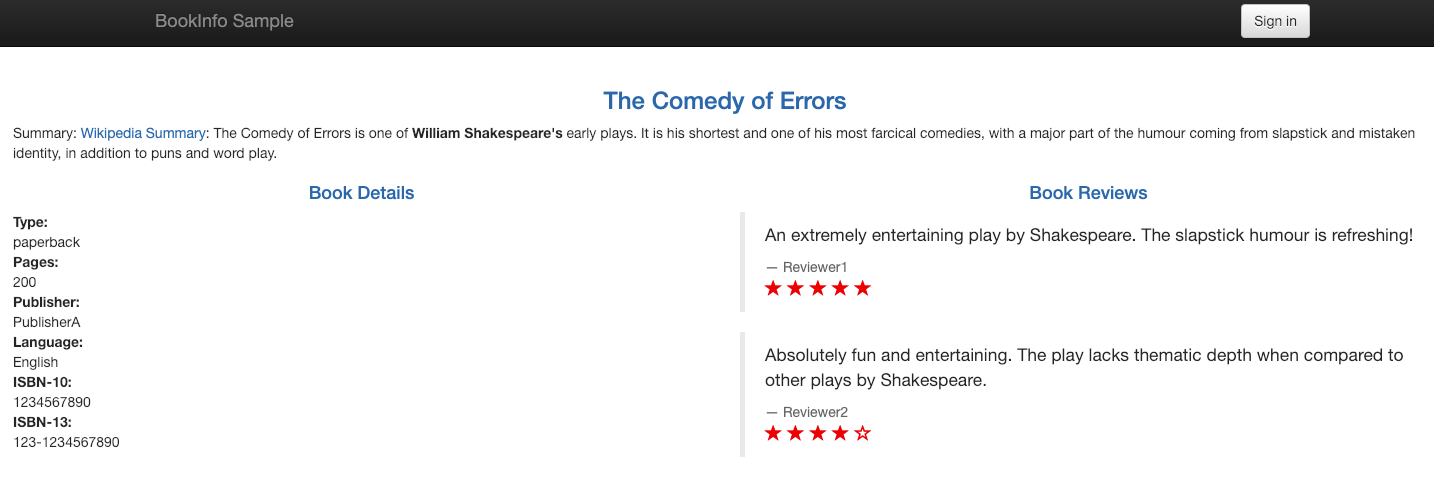
以下の画面が出ればデプロイメント完了です。
gatewayとvirtualserviceの内容を見るとどのようなことが実現できるかわかりやすくなっています。
$ kubectl get gateway bookinfo-gateway -o yaml

apiVersion: networking.istio.io/v1alpha3
kind: Gateway
metadata:
  annotations:
    kubectl.kubernetes.io/last-applied-configuration: |
      {"apiVersion":"networking.istio.io/v1alpha3","kind":"Gateway","metadata":{"annotations":{},"name":"bookinfo-gateway","namespace":"default"},"spec":{"selector":{"istio":"ingressgateway"},"servers":[{"hosts":["*"],"port":{"name":"http","number":80,"protocol":"HTTP"}}]}}
  creationTimestamp: "2018-12-30T16:37:06Z"
  generation: 1
  name: bookinfo-gateway
  namespace: default
  resourceVersion: "6129"
  selfLink: /apis/networking.istio.io/v1alpha3/namespaces/default/gateways/bookinfo-gateway
  uid: 24c1ecbc-0c51-11e9-b0fd-0625a0a3aa5a
spec:
  selector:
    istio: ingressgateway
  servers:
  - hosts:
    - '*'
    port:
      name: http
      number: 80
      protocol: HTTP
$ kubectl get virtualservice -o yaml

apiVersion: v1
items:
- apiVersion: networking.istio.io/v1alpha3
  kind: VirtualService
  metadata:
    annotations:
      kubectl.kubernetes.io/last-applied-configuration: |
        {"apiVersion":"networking.istio.io/v1alpha3","kind":"VirtualService","metadata":{"annotations":{},"name":"bookinfo","namespace":"default"},"spec":{"gateways":["bookinfo-gateway"],"hosts":["*"],"http":[{"match":[{"uri":{"exact":"/productpage"}},{"uri":{"exact":"/login"}},{"uri":{"exact":"/logout"}},{"uri":{"prefix":"/api/v1/products"}}],"route":[{"destination":{"host":"productpage","port":{"number":9080}}}]}]}}
    creationTimestamp: "2018-12-30T16:37:06Z"
    generation: 1
    name: bookinfo
    namespace: default
    resourceVersion: "6130"
    selfLink: /apis/networking.istio.io/v1alpha3/namespaces/default/virtualservices/bookinfo
    uid: 24cbe4b1-0c51-11e9-b0fd-0625a0a3aa5a
  spec:
    gateways:
    - bookinfo-gateway
    hosts:
    - '*'
    http:
    - match:
      - uri:
          exact: /productpage
      - uri:
          exact: /login
      - uri:
          exact: /logout
      - uri:
          prefix: /api/v1/products
      route:
      - destination:
          host: productpage
          port:
            number: 9080
kind: List
metadata:
  resourceVersion: ""
  selfLink: ""
何回かリロードすると別バージョンの画面が表示されるような動きとなります。
Destination Rule を創る
サンプルに含まれているDestinationRuleを作成します。
$ kubectl apply -f istio-1.0.6/samples/bookinfo/networking/destination-rule-all.yaml

destinationrule.networking.istio.io/productpage created
destinationrule.networking.istio.io/reviews created
destinationrule.networking.istio.io/ratings created
destinationrule.networking.istio.io/details created
作成した結果を確認します。
$ kubectl get destinationrules -o yaml

apiVersion: v1
items:
- apiVersion: networking.istio.io/v1alpha3
  kind: DestinationRule
  metadata:
    annotations:
      kubectl.kubernetes.io/last-applied-configuration: |
        {"apiVersion":"networking.istio.io/v1alpha3","kind":"DestinationRule","metadata":{"annotations":{},"name":"details","namespace":"default"},"spec":{"host":"details","subsets":[{"labels":{"version":"v1"},"name":"v1"},{"labels":{"version":"v2"},"name":"v2"}]}}
    creationTimestamp: "2018-12-30T17:24:11Z"
    generation: 1
    name: details
    namespace: default
    resourceVersion: "10716"
    selfLink: /apis/networking.istio.io/v1alpha3/namespaces/default/destinationrules/details
    uid: b8e2036f-0c57-11e9-b0fd-0625a0a3aa5a
  spec:
    host: details
    subsets:
    - labels:
        version: v1
      name: v1
    - labels:
        version: v2
      name: v2
- apiVersion: networking.istio.io/v1alpha3
  kind: DestinationRule
  metadata:
    annotations:
      kubectl.kubernetes.io/last-applied-configuration: |
        {"apiVersion":"networking.istio.io/v1alpha3","kind":"DestinationRule","metadata":{"annotations":{},"name":"productpage","namespace":"default"},"spec":{"host":"productpage","subsets":[{"labels":{"version":"v1"},"name":"v1"}]}}
    creationTimestamp: "2018-12-30T17:24:11Z"
    generation: 1
    name: productpage
    namespace: default
    resourceVersion: "10712"
    selfLink: /apis/networking.istio.io/v1alpha3/namespaces/default/destinationrules/productpage
    uid: b8c4ffa0-0c57-11e9-b0fd-0625a0a3aa5a
  spec:
    host: productpage
    subsets:
    - labels:
        version: v1
      name: v1
- apiVersion: networking.istio.io/v1alpha3
  kind: DestinationRule
  metadata:
    annotations:
      kubectl.kubernetes.io/last-applied-configuration: |
        {"apiVersion":"networking.istio.io/v1alpha3","kind":"DestinationRule","metadata":{"annotations":{},"name":"ratings","namespace":"default"},"spec":{"host":"ratings","subsets":[{"labels":{"version":"v1"},"name":"v1"},{"labels":{"version":"v2"},"name":"v2"},{"labels":{"version":"v2-mysql"},"name":"v2-mysql"},{"labels":{"version":"v2-mysql-vm"},"name":"v2-mysql-vm"}]}}
    creationTimestamp: "2018-12-30T17:24:11Z"
    generation: 1
    name: ratings
    namespace: default
    resourceVersion: "10715"
    selfLink: /apis/networking.istio.io/v1alpha3/namespaces/default/destinationrules/ratings
    uid: b8d8fa1b-0c57-11e9-b0fd-0625a0a3aa5a
  spec:
    host: ratings
    subsets:
    - labels:
        version: v1
      name: v1
    - labels:
        version: v2
      name: v2
    - labels:
        version: v2-mysql
      name: v2-mysql
    - labels:
        version: v2-mysql-vm
      name: v2-mysql-vm
- apiVersion: networking.istio.io/v1alpha3
  kind: DestinationRule
  metadata:
    annotations:
      kubectl.kubernetes.io/last-applied-configuration: |
        {"apiVersion":"networking.istio.io/v1alpha3","kind":"DestinationRule","metadata":{"annotations":{},"name":"reviews","namespace":"default"},"spec":{"host":"reviews","subsets":[{"labels":{"version":"v1"},"name":"v1"},{"labels":{"version":"v2"},"name":"v2"},{"labels":{"version":"v3"},"name":"v3"}]}}
    creationTimestamp: "2018-12-30T17:24:11Z"
    generation: 1
    name: reviews
    namespace: default
    resourceVersion: "10714"
    selfLink: /apis/networking.istio.io/v1alpha3/namespaces/default/destinationrules/reviews
    uid: b8cf6682-0c57-11e9-b0fd-0625a0a3aa5a
  spec:
    host: reviews
    subsets:
    - labels:
        version: v1
      name: v1
    - labels:
        version: v2
      name: v2
    - labels:
        version: v3
      name: v3
kind: List
metadata:
  resourceVersion: ""
  selfLink: ""
Intelligent Routing を体験する
ここではIstioが持つ3つの機能を体験します。 それぞれ機能ごとに試してきます、機能については簡単に後ほど説明がでてきます。
- Request Routing
- Fault Injection
- Trafffic Shifting
Request Routing
ここで試すマニフェストを実行するとv1のページにしかアクセスができなくなります。
$ kubectl apply -f istio-1.0.6/samples/bookinfo/networking/virtual-service-all-v1.yaml

virtualservice.networking.istio.io/productpage created
virtualservice.networking.istio.io/reviews created
virtualservice.networking.istio.io/ratings created
実行したマニフェストファイルを確認しておきましょう。
apiVersion: networking.istio.io/v1alpha3
kind: VirtualService
metadata:
  name: productpage
spec:
  hosts:
  - productpage
  http:
  - route:
    - destination:
        host: productpage
        subset: v1
---
apiVersion: networking.istio.io/v1alpha3
kind: VirtualService
metadata:
  name: reviews
spec:
  hosts:
  - reviews
  http:
  - route:
    - destination:
        host: reviews
        subset: v1
---
apiVersion: networking.istio.io/v1alpha3
kind: VirtualService
metadata:
  name: ratings
spec:
  hosts:
  - ratings
  http:
  - route:
    - destination:
        host: ratings
        subset: v1
---
apiVersion: networking.istio.io/v1alpha3
kind: VirtualService
metadata:
  name: details
spec:
  hosts:
  - details
  http:
  - route:
    - destination:
        host: details
        subset: v1
---
特定ユーザのルーティングも実現できます。
jason ユーザでログイン(パスワードなし)するとv2 黒星のレーティングシステムにルーティングされます。
$ kubectl apply -f istio-1.0.6/samples/bookinfo/networking/virtual-service-reviews-test-v2.yaml

virtualservice.networking.istio.io/reviews configured
ここでは実行したマニフェストを各自確認してみましょう。
ここまで来たら後続の体験をするためクリーンアップをします。
$ kubectl delete -f istio-1.0.6/samples/bookinfo/networking/virtual-service-all-v1.yaml

virtualservice.networking.istio.io "productpage" deleted
virtualservice.networking.istio.io "reviews" deleted
virtualservice.networking.istio.io "ratings" deleted
virtualservice.networking.istio.io "details" deleted
Fualt Injection
マイクロサービス間のタイムアウトなどのテストを簡易化する方法として``Fault Injection`` が存在します。 コンポーネント間のやりとりが多くなるためその間でエラー等が発生し、接続できない場合のテストが容易になります。
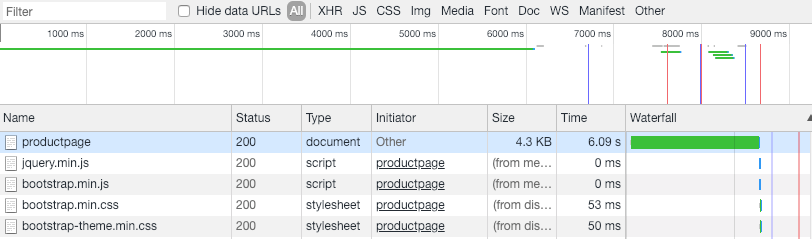
Bookappsマイクロサービスをjasonユーザでログインしたときのみreview:v2 と ratingsの間で7sec の遅延を入れる。
$ kubectl apply -f istio-1.0.6/samples/bookinfo/networking/virtual-service-ratings-test-delay.yaml

virtualservice.networking.istio.io/ratings configured
マニフェスト実行後はエラーがとなることが期待する動作となります。

ChromeのDeveloperツールで見るとページのロードを開始するまで6秒ほどかかっているのがわかります。 先程の7secという指定は全体で7secぐらいという感覚で使うのがよいということがわかりました。
さらに1つサンプルとしてHTTPリターンコードを変更する方法を体験します。
jason ユーザでログインした場合、100% HTTP Status 500 を返すという設定です。 ここでもマニフェストの内容は各自確認してみてください。
$ kubectl apply -f istio-1.0.6/samples/bookinfo/networking/virtual-service-ratings-test-abort.yaml

virtualservice.networking.istio.io/ratings configured
jasonでログインし、HTTP 500 がリターンされることを確認しましょう。
Traffic Shifting
トラフィックを段階的に別のバージョン振り分けていく方法です。 比率を設定することでバージョンごとに振り分けられる比率を変更しています。
こちらもマニフェストは各自確認し、意味を理解しましょう。
kubectl apply -f istio-1.0.6/samples/bookinfo/networking/virtual-service-reviews-50-v3.yaml

virtualservice.networking.istio.io/reviews configured
マニフェストの中身です。
apiVersion: networking.istio.io/v1alpha3
kind: VirtualService
metadata:
  name: reviews
spec:
  hosts:
    - reviews
  http:
  - route:
    - destination:
        host: reviews
        subset: v1
      weight: 50
    - destination:
        host: reviews
        subset: v3
      weight: 50
応用方法
ここまででIstioの代表的な機能について体験しました。
ここまでで体験したことで以下のようなことが実現できます。
- A/B テスト
- Blue/Green デプロイ
- Ganary リリース
Level3 で準備したアプリケーションで上記3つのいずれかを実現することにチャレンジしてみましょう。
また、サンプルとして以下のようなジョークアプリケーションも準備しています。
Istio マネージドサービスを使う
Level4でも登場したNetApp Kubernetes Service(NKS)を使うと上記のようなオペレーションを管理画面から行うことができます。
現在(2019/3)時点では、AWS、Azure、GCP上にKubernetesクラスタを構成することができ、そのクラスタにIstioのデプロイも同時に可能です。
また、ここまで記載したIntelligent Routing についてもGUIから簡単に操作することができます。
ここからは別ページでNKSを使用した場合のIntelligent Routingについて紹介します。